

Using the guides
Read Plannery's country, city, and neighborhood guides, open any place to see photos, hours, and sources, and add it to a trip — or start a trip from it.
Plannery's guides are researched write-ups of countries, cities, and neighborhoods, each with its own curated places. You can read them without signing in, save any place with Want to go, and add a place straight onto a trip — or start a new trip from one.
Finding a guide
Go to Guides (/guides). Every destination is a cover card, grouped by country.

- A row of chips filters the grid: All, then one chip per country with its flag.
- Tap a cover to open that guide. The breadcrumb trail at the top (Guides › Country › City) takes you back up.
On a phone, Guides is also under More in the bottom bar.
Country guides
A country guide opens with a short cultural overview, then four sections:
- Cities — the country's city guides, most popular first.
- Language — useful phrases, grouped by situation.
- Etiquette — rows such as Tipping, Dining, Dress, and Greetings.
- Practical — Currency, Plug type, Tap water, and the Emergency number.
City guides
A city guide shows only the sections it has content for, so a newly added city may have fewer than the full set:
Top Sights — the must-do places. In a single-neighborhood destination this widens to Things to Do and covers every place.
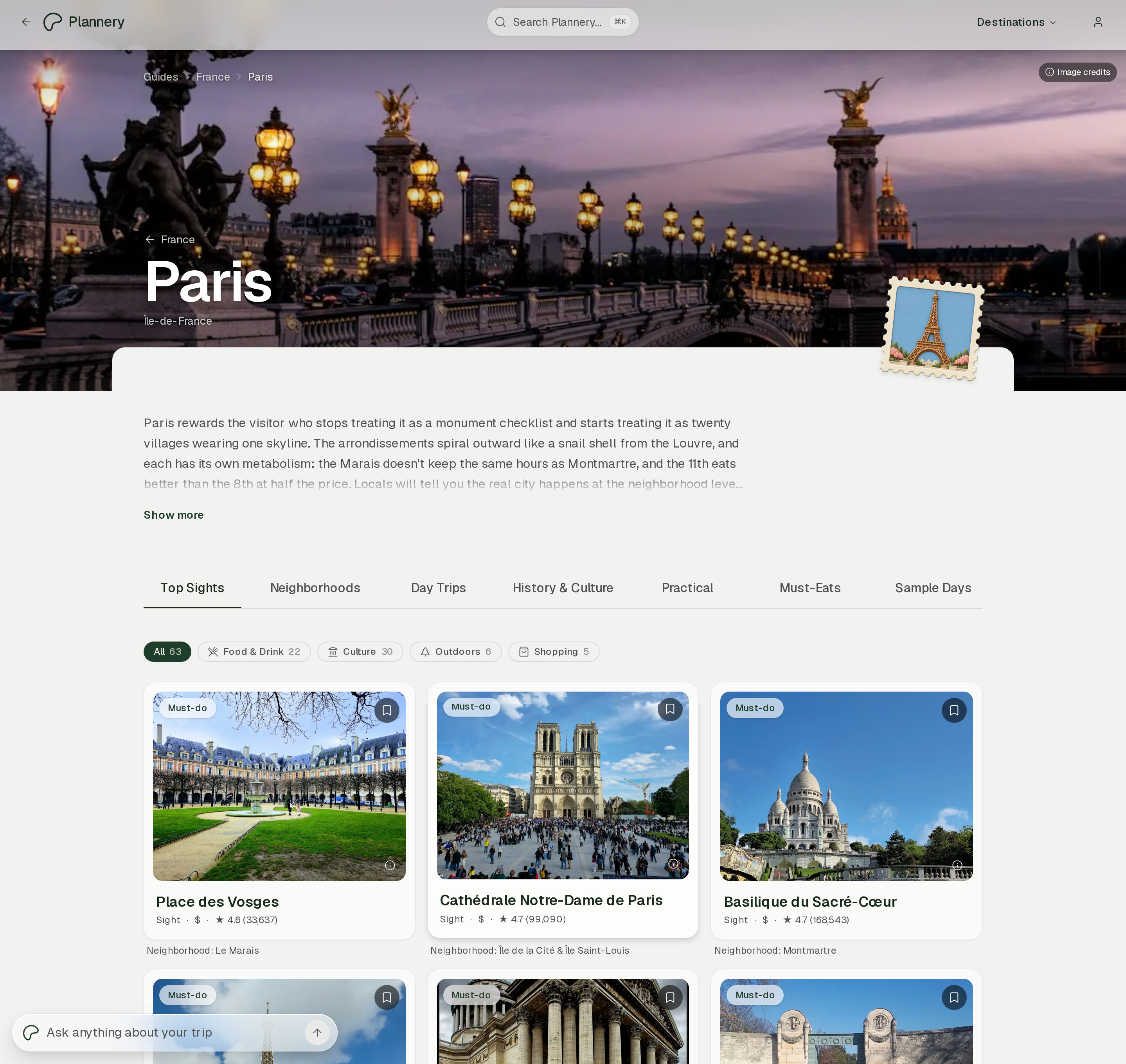
Neighborhoods — one card per area, each opening its own page. Not shown for single-neighborhood destinations.
Day Trips — researched trips out of the city.
History & Culture
Practical — local practicalities and the best months to visit.
Must-Eats — the dishes to look for.
Sample Days — example days built from the guide's places, which you can add to a trip whole.

Neighborhood pages
A neighborhood page has the area's name and a one-line feel for it, a grid of its places, a Things to know box, and a map.
The place sheet
Tap any place card to open its sheet.

- Photos — a carousel; each photo carries its own credit in the corner.
- Under the name: the rating, a Must see badge for marquee places, and the place type.
- Hours — today's hours, with a toggle for the full week. A closed venue shows Temporarily closed or Permanently closed instead.
- Sections, shown only when they have content: Highlights (or Must Eats for food and drink), Info (what to know before you go), Details (the long write-up), and Sources (where the facts came from).
- Get Directions, Website, and — on a phone — Call.
- Ask about this place opens Ask Plannery with this place as the subject.
Saving and adding a place
Two controls sit on every place:
- The bookmark saves it to Want to go. It works with no trip open, so you can shortlist places for a trip you haven't created yet. Once saved it reads Saved; tap again to remove.
- Add to Itinerary schedules it. From inside a trip you go straight to picking a day. Otherwise an Add to trip dialog asks which trip first. Signed out, either control asks you to log in.
Starting a trip from a place
- Open the place and tap Add to Itinerary.
- In the Add to trip dialog, tap Create a new trip.
- The create-trip flow opens with the place's city already chosen as a destination. Once the trip exists, the place is added to it for you.
The same guides also appear inside a trip's Explore tab, under Guides, with each card showing your trip's state.